Wednesday, March 30, 2016

Digital Blog Post #E

The first thing I found interesting was from chapter nine. It is called media synergy. Media synergy is video, digital, and print materials combined with face-to-face instruction to build powerful learning environments for students. Multimedia is a vital part to media synergy, but they are not the same thing. With multimedia, it is presenting a lecture with words and pictures. Some examples of media synergy are YouTube videos, power points, and other related things. This caught my attention because I had never heard this term before. I think media synergy is definitely something I will use as a future teacher to help further my students knowledge on whatever topic I am teaching, even though I plan to teach kindergarten! There are still a plethora of websites and tools and media synergy to be used even when teaching younger students! I made a ToonDoo of something I would love to do with my kindergartners when I become a teacher. (As long as there is a supervisor in the classroom of course!)
The second thing I found interesting from chapter nine is called next-generation web 2.0 presentation tools. These tools use multimedia to expand the ways that information is shared in classrooms. some examples of these tools are Prezi, Animoto, and Glogster. I have heard of Prezi before, but I have never heard of Animoto or Glogster. Animoto enables teachers to use video clips, pictures, sound, and text to broaden how students can learn. Glogster allows teachers and students to create digital posters called glogs that use photos, sound, and text with graphics. They can be shared on a website, blog, or can be shared through email. I think these tools will especially be useful in middle school and high school because students these days are so accustomed to having technology at their fingertips that these tools would be perfect for them. I think that students will be able to share more information and learn with each other without even being in the classroom. This article has an informational video along with an article on why Prezi is helpful and very useful for learning and in general.

The last thing I found interesting was in chapter eleven. It is called a digital teaching portfolio. This caught my attention because I know that we get to make one for this class! What it is is a collection of educational and professional materials stored in an electronic format. It is the same as an artists portfolio, engineer, etc. Only you are collecting things that have to do with your educational materials. I personally think this is really awesome because after so many years of teaching it will be fun to look back and see how far you have come as a teacher and you can add new things to it so you can show how your teaching style has or has not changed. Here is a link to a video on how student teachers can construct their own digital portfolio.


Resources:

Maloy, Robert, Verock-O’Loughlin,Ruth-Ellen, Edwards, Sharon A., and Woolf, Beverly Park (2013). Transforming Learning with New Technologies. 2nd Edition. Boston, MA: Pearson Education, Inc.

Pinder, S (2016, March 30). Teaching with Technology. Created with ToonDoo http://toondoo.com/createToon.do

Top 5 reasons to Prezi. (2012). Retrieved March 30, 2016, from https://blogs.library.ucsf.edu/betterpresenter/2012/12/14/top-5-reasons-to-prezi/

 
T. (2013). Teaching Portfolio Video Tutorial (for student teachers at USU - TEAL). Retrieved March 30, 2016, from https://www.youtube.com/watch?v=gbbEMtGKabE
 

Monday, February 29, 2016

Digital Blog Post #D

I found a lot of things from chapters eight and ten very interesting. The first thing from chapter eight that caught my eye was Wiki's! Before we were assigned the group Wiki, I had no idea what it was. I really enjoyed doing the group project, and loved learning about them a little more. A Wiki is a website tool for students and teachers. It allows them to communicate through a blog-like style. The teacher/students can edit or revise each others ideas, which is a great way to share information! A fun thing I learned from this is that "wiki" is actually Hawaiian and it means quickly or rapidly. This article is another take on Wiki's and how else they can be used to help students learn other cool, different things like entrepreneurship.

Another thing I found interesting from chapter eight was synchronous and asynchronous communications. These are two different types of communication for teachers and students. Synchronous is a type of communication where you do not have to wait for a response. An example of synchronous communication would be a phone call, text message, or a face to face conversation. Asynchronous communication is one where you have to wait for a response. Examples of these would be an email, blog, or an online discussion. To me, synchronous communication would be more helpful as a future teacher and as a student because you get the response you need right away!

The last thing I found interesting was from chapter ten. It was on interactive electronic storybooks. An easier and more well-known term for this is called a CD-ROM. I thought this was interesting because these are something I'm sure we have all heard or before, but never really put much thought into it. As a college student, sometimes you have the option to buy your textbook on campus or you can buy it as an e-book, which is the exact same thing, and it's so much cheaper! I personally like using these types of tools because it saves money and it can also save time. It also prevents you from losing your textbook, which I am sure we can all relate to! As for elementary and middle schools, there are interactive apps that you can get on your computer, tablet, or smartphone. They are called storybook apps. They allow students to be read to or read on their smart phones, tablets, or computers. Below is an example from YouTube of an app that does these cool things!


Overall, both of these chapters were very interesting and very helpful. I learned some fun facts, and a lot more educational technologies that can be used to enhance learning in all types of classrooms. My favorite thing that I learned was the storybook apps. When I was in elementary school, we had to check out books from the library and take them home, and usually there was no "digital copy"! It is so cool to see how far technology has come, and I can't wait to see what they come up with when I become a teacher!

Resources: 

McCrea, B. (2010, October 20). THE News Update. Retrieved February 29, 2016, from https://thejournal.com/articles/2010/10/20/wikis-pulling-it-all-together-online.aspx

Pinder, S (2016, February 29). Infograph. Created with Piktochart http://magic.piktochart.com

Who stole the moon? Storybook App | Top Best Apps For Kids. (2014, December 24). Retrieved February 29, 2016, from https://www.youtube.com/watch?v=xI9CJQSJiBg

Monday, February 15, 2016

Blog Post #C

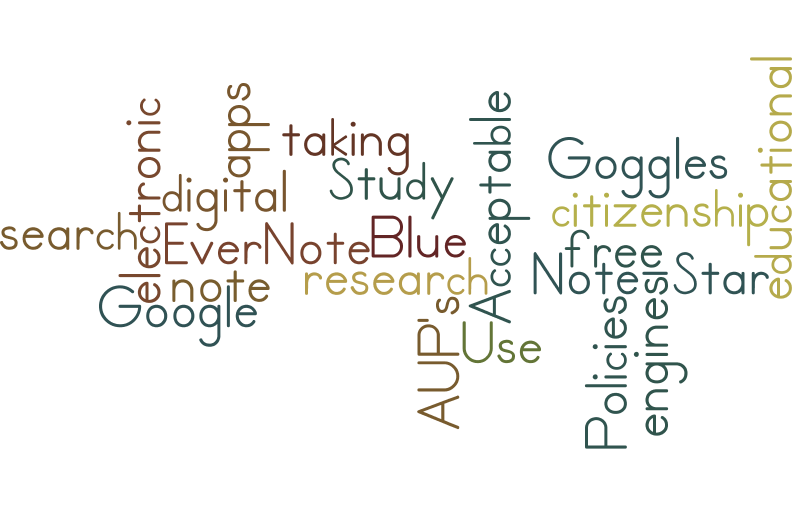
         The first thing I found interesting from chapter five was the electronic note taking. This is something I have never heard of before, so it really caught my attention. How cool that you can take notes online wherever you are and study from wherever you are? The ones from the book that I thought was the most interesting were Evernote and Note-Star. With Evernote you can take notes on any type of device. You can use a computer, your smart phone, your tablet, and anything else you can think of. The second one I found most interesting was Note-Star. With Note-Star you can not only take notes, but you can also create sub-topics for research papers, and create printable notes and bibliographies. One that I found while searching Google is Study Blue. This tool allows students to create online flash cards, study guides, and quizzes. They can even share them on social media with fellow classmates when finished!
         The second thing I found the most interesting was Google Goggles. This is a tool by Google that allows students (or anyone) to take a picture of an object or a landmark using the app by Google and whatever you search will pop up. How cool that technology allows us to do these things these days. This will especially be useful for students because if they are not sure of what something is called or what a certain landmark is, then they can use the Google Goggles for help! It is for your mobile device.
         The last thing I found interesting in this chapter was AUP's. AUP stands for Acceptable Use Policies. These policies state the rules that students have to follow when using the internet in schools. They basically state what the students can and can not access. If students still try to and/or succeed in accessing these websites or other things that they are blocked from they face punishments. Some punishments include getting their cell phones taken away, in-school detention, and sometimes even suspension from school in general. AUP's are trying to teach students digital citizenship, which is necessary to teach if technology is being integrated into schoools.

Here is my Wordle that I created for this chapter!
Resources:


Maloy, R., O'Loughlin, R., Edwards, S., & Woolf, B. (2013). Transforming Learning with New Technologies. 2nd Edition. Boston, MA: Pearson Education Inc.

Pinder, S (2016, February 15) Wordle Post. Created with Wordle www.wordle.net/create

Google. (2016, February 15) Google Goggles. (Video file.) Retrieved from https://www.youtube.com/watch?v=Hhgfz0zPmH4

Thursday, February 4, 2016

Blog Post #B

The first thing I found interesting from chapter 2 was the Information and Communication Technologies, or ICT's. According to the textbook, these are things that we encounter every time we use a computer. What I found interesting about them is that they are not only something you access by internet or by some sort of software that is already on the computer, but it is also something that can be plugged into a computer to further a students learning. One of these websites that I thought was interesting was pbskids.org. Here, kids can play learning and counting games, and watch educational videos. In my future classroom, seeing as I want to teach kindergarten, I think this website among many others will be very helpful, and I definitely plan to use them.

The second thing I found interesting was NETS. NETS is a belief that technology makes new learning experiences possible. It stands for National Educational Technology Standards. This allows teachers and schools all around to promote creative thinking, prepare students for citizenship in the virtual world, problem solving techniques and so much more all while addressing all types of learners through technology. I liked this and found it interesting because I think it is important that creative learning and new approaches to learning are being encouraged in classrooms through technology. Students should be able to use technology to learn more things and become more knowledgeable about any topic they are learning in class, or something that just interests them.  To actually read the standards, you can click here! Though I do think standards for technology should be too limiting to students, I do agree with them because sometimes students do get carried away.

Lastly, the third thing I liked from chapter 3 was the student-based approach section. I think it is so important that students get to work in groups and collaborate. Whether it be comparing answers to something, a project, or anything else, I really think group work is so important. It allows the students to help each other and get different opinions from one another and it also allows some students to better understand what the key concepts really are in case the students did not understand it from the teacher. I like that it suggests that learning comes from the real world, problem solving techniques. I like that this means you can take your students on a field trip to somewhere that has something to do with what you are learning, and this way they can learn hands-on. In my comic, it shows my future students being excited for group work!
In conclusion, both chapters two and three were very informational. I love learning and reading about the 21st century technology ideas that teachers, parents, students, and schools come up with to incorporate technology into the classroom. I learned that I definitely like the student-centered approach to things more than I like the teacher-centered approach because I think it is so important that students get to work together sometimes and collaborate on assignments and projects rather than just listen to a teacher lecture all day then get tested on the lecture.


Resources:


    Maloy, Robert, Verock-O’Loughlin,Ruth-Ellen, Edwards, Sharon A., and Woolf, Beverly Park (2013). Transforming Learning with New Technologies. 2nd Edition. Boston, MA: Pearson Education, Inc.

PBSKIDS.ORG


    National Educational Technology Standards for Students. (n.d.). Retrieved February 4, 2016, from http://www.kelloggllc.com/tpc/nets.pdf

Pinder, S (2016, February 4). Group Work. Created with Bitstrips  http://www.bitstripsforschools.com/comics/1L8SW1/